
User Guide - SMSF Change of Trustee (AML)
This guide walks you through ordering a Change of Trustee for an SMSF — the six types of trustee change available, the information the form needs at each step, and the customer identity verification now required under Australia's AML/CTF laws.
The Change of Trustee order produces the Change of Trustee Deed (i.e. Deed of Retirement, Deed of Appointment or Deed of Retirement and Appointment) together with the supporting documents for the change, including trustee minutes.
What you need on hand
- The fund's current governing rules — you'll be asked for the specific rule or clause numbers that permit the appointment and removal of trustees, so have the deed (and any variations) open.
- The fund's variation history — the dates of every deed variation since establishment.
- Full names and residential addresses of the incoming and continuing trustees or directors.
- An email address for every incoming trustee or director — if subject to full CDD via the platform (ie. no reliance agreement in place),this is required so the identity verification check can be sent where needed. See Step 1 below.
- The corporate trustee's company name, ACN and registered address, if a company is being appointed.
Tip: If your practice SMSF software is connected under Integrations at the top of the form, use Connect to pull the fund's details across rather than keying them in.
A change of trustee is a designated service under the AML/CTF laws. That means the order cannot be released until identity verification requirements have been met for the relevant people or a reliance agreement is in place between the firm ordering the document and Smarter SMSF. Work through Step 1 before you start entering fund data — it determines what else the form asks you for.
2. Step 1 — Customer Identity Verification (AML/CTF)
Why this section exists
From 1 July 2026, professional services including SMSF documentation fall within the scope of the Anti-Money Laundering and Counter-Terrorism Financing Act 2006 (Cth). Smarter SMSF is a reporting entity and must be satisfied that customer due diligence (CDD) has been completed on the relevant people before a designated service — such as a change of trustee — is provided.
There are two ways that requirement is met:
| Path | How it works |
|---|---|
| Reliance agreement
Firms with their own AML/CTF program |
Your firm has executed a reliance agreement with Smarter SMSF. You perform the KYC on your clients under your own program, and Smarter SMSF relies on it. You confirm this on each order by answering Yes to the KYC question and making the declaration. See how Reliance Membership works (Pathway A) |
| Full CDD via VerifiMe
All other firms |
Smarter SMSF performs the CDD. Each relevant person receives a digital verification invitation (a short check requiring government-issued photo ID). Verified records are reusable for 12 months across all orders. |
Where a Reliance Membership exists with the user, the following question will appear:
The question: "Have you completed full KYC (not concession-only) for all trustees/directors?"
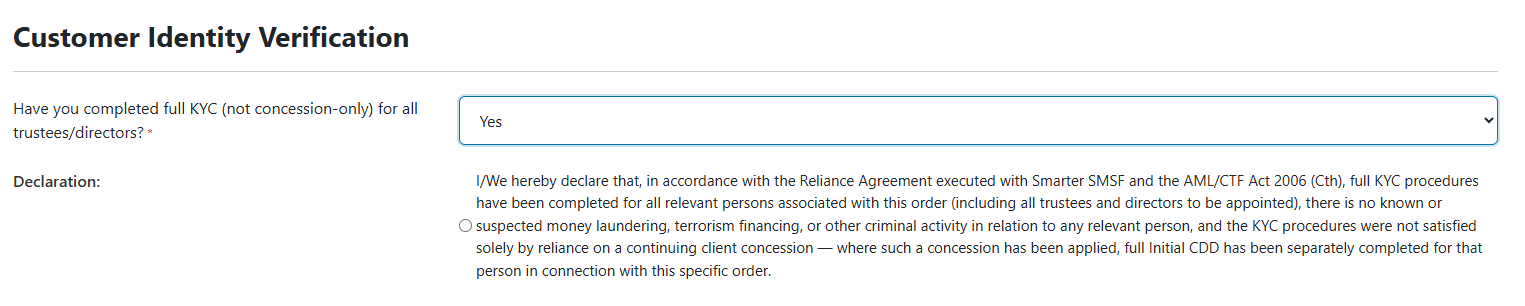
Answer Yes if:
- Your firm holds a reliance agreement with Smarter SMSF; and
- You have completed full initial CDD on every relevant person for this order — including every trustee and every director being appointed; and
- You have no knowledge or suspicion of money laundering, terrorism financing or other criminal activity in relation to any of them.
Answering Yes reveals a Declaration you must select before the order can proceed. The declaration is your firm's formal confirmation, on this order, that those three things are true.The "concession-only" trap — read this before answering Yes.
A person who was accepted as a continuing or existing client under a concession has not necessarily had full initial CDD performed. The concession lets you continue servicing them; it is not a substitute for identifying them.
If the only basis on which a person has been "verified" is that concession, you cannot answer Yes for them until full initial CDD has been separately completed for that person in connection with this specific order. When in doubt, answer No and complete the verification.
Answer No if:
- Your firm does not have a reliance agreement; or
- Any relevant person has not had full initial CDD completed; or
- You are relying on a continuing-client concession for any of them.
Answering No is not a problem and does not stop the order. It routes the order down the full CDD path: each incoming trustee or director is sent a verification invitation to the email address you supply later in the form.
Who counts as a "relevant person"
For a change of trustee, verification covers every trustee and every director being appointed by this order. This is why the form asks for an individual email address for each incoming person, and why you cannot use a single generic practice email for all of them.
Adviser note. Beneficial ownership matters at the firm level, not the fund level, in this workflow — your firm's own onboarding with Smarter SMSF covers directors and beneficial owners of the practice. The order-level question is about the people being appointed to the fund.
What happens after you order
- Where verification is required, each person receives an invitation and completes a short digital identity check.
- You can monitor progress at any time under Order KYC Status in the top navigation.
- A LOW or MEDIUM risk result releases the documents.
- A HIGH risk result places the order on hold and notifies the Smarter SMSF compliance team, who will review and contact you — generally within one business day.
- Verified records are retained against your account and can be reused for that person for 12 months, with no new check and no new fee.
3. Step 2 — Fund details
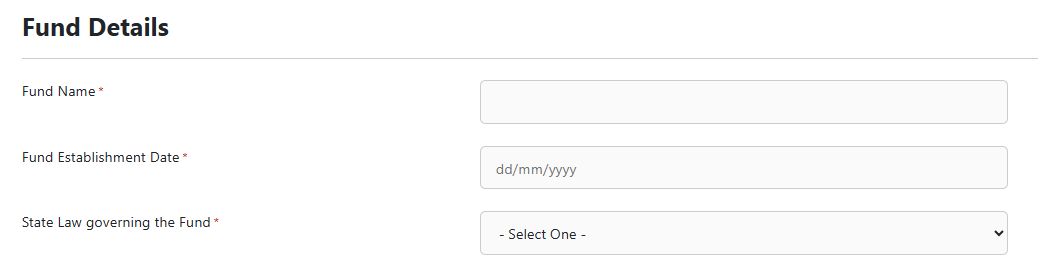
| Field | What to enter |
|---|---|
| Your Ref | Your own file or job reference. It appears on the order so you can match it back to your practice records. |
| Fund Name | The full name of the SMSF exactly as it appears in the current deed. Check spelling and any "Superannuation Fund" / "Super Fund" wording — this flows through to every document produced. |
| Fund Establishment Date | The date the fund was originally established (DD/MM/YYYY), not the date of the most recent deed variation. |
| State Law governing the Fund | The jurisdiction nominated in the deed — ACT, NSW, NT, QLD, SA, TAS, VIC or WA. |
| Fund Address | Start typing and select from the address lookup. If the address won't validate — rural properties and new estates are common culprits — tick Manual Address Override and enter the level/unit, street, suburb, state and postcode manually. |
Adviser note on governing law. The nominated state law drives the deed's construction and, in some states, duty and trustee-legislation consequences. Don't default to the state the members live in — take it from the deed.
4. Step 3 — Choosing the right type of trustee change
This is the single most important selection on the form. It controls which fields appear, what the deed recites, and which supporting documents are produced. Choosing wrongly means re-ordering.
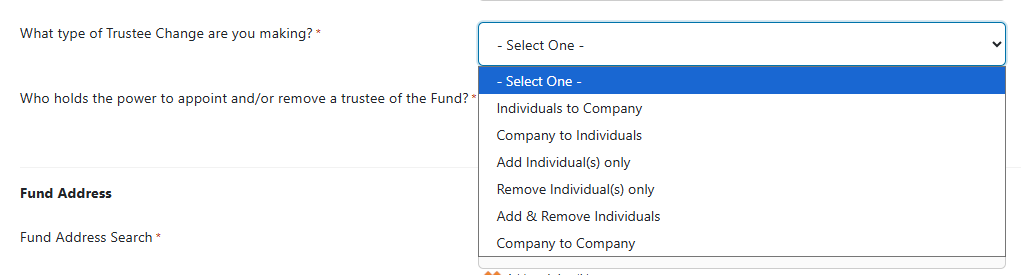
| Change type | Use it when | The form will then ask for |
|---|---|---|
| Individuals to Company | The fund currently has individual trustees and a corporate trustee is being appointed in their place. | Number of individual trustees being removed and their details; the new company's name, A.C.N., number of directors and registered address; details and email for each incoming director. |
| Company to Individuals | The existing corporate trustee is retiring and individuals are being appointed in its place. | The outgoing company's name, ACN, number of directors and registered address; how many individuals are being appointed, with details and an email for each. |
| Add Individual(s) only | Individual trustees are staying on and one or more individuals are joining them — for example, a new member being admitted. | How many individual trustees the fund currently has; how many are being appointed, with details and an email for each. Removal fields are hidden. |
| Remove Individual(s) only | One or more individual trustees are leaving and the remaining individuals continue — for example, a death, a resignation, or a member exiting. | How many individual trustees are continuing and how many are being removed, with details for each; how the trustee is being removed. Appointment fields are hidden. |
| Add & Remove Individuals | Both happen at once — someone leaves and someone joins in the same transaction. This is the usual choice for a relationship breakdown or a generational change. | Continuing, outgoing and incoming individuals, with details for each and an email for the incoming; how the trustee is being removed. |
| Company to Company | One corporate trustee is being replaced with a different corporate trustee — for example, moving from an operating company to a dedicated sole-purpose trustee company. | The outgoing company's name, ACN, directors and registered address; the incoming company's name, A.C.N., number of directors and registered address, plus details and an email for each incoming director. |
Common mis-selections
- A member dies and the surviving members continue. Use the 'Change of Trustee - Death of a Member' form instead.
- Changing directors of the existing corporate trustee. That is not a change of trustee — the trustee remains the same company. It's a company officeholder change, use the 'Changes to Directors' form instead.
- Moving to a corporate trustee where one individual continues as sole director. Still Individuals to Company — the trustee itself is changing.
Sole member funds: where a corporate trustee is being appointed, remember the fund must satisfy the SIS trustee/member rules — a single-member fund with a corporate trustee needs either a sole director who is the member, or two directors where the second meets the relationship or non-employment tests.
5. Step 4 — Who holds the power to appoint and remove a trustee
Take this from the fund's current governing rules, not from practice. Selecting the wrong holder of the power produces a deed executed by the wrong parties.
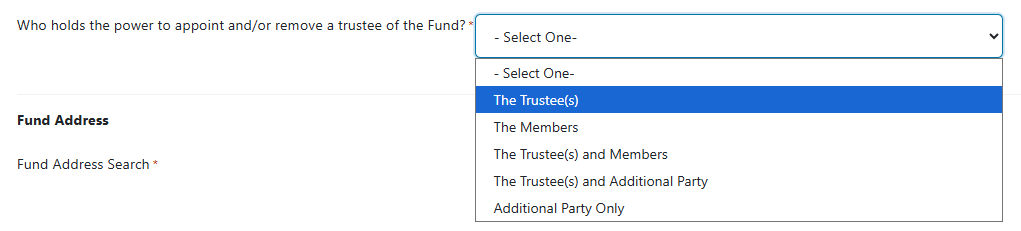
| Option | Choose when the deed vests the power in… |
|---|---|
| The Trustee(s) | The existing trustee alone. |
| The Members | The members alone. |
| The Trustee(s) and Members | Both acting together — the most common position in modern deeds. |
| The Trustee(s) and Additional Party | The trustee together with a named third party such as a principal employer or founder. |
| Additional Party Only | The third party alone holds the power. |
If an Additional Party is involved
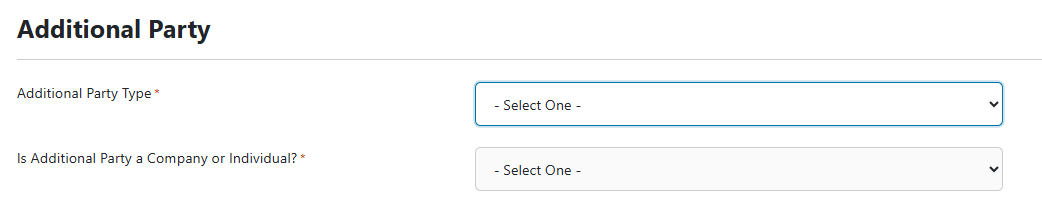
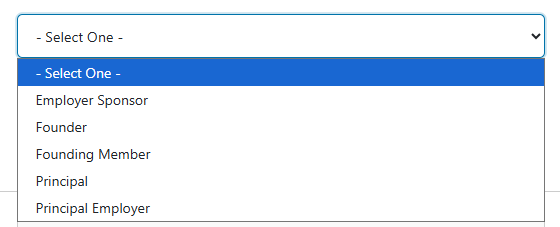
Selecting either of the last two options opens a further set of fields:
- Additional Party Type — Employer Sponsor, Founder, Founding Member, Principal, or Principal Employer. Use the label the deed itself uses.
- Is the Additional Party a Company or an Individual — a company requires the company name and ACN; an individual requires their name.
- Additional Party Address.
Adviser note. Older deeds frequently reserve the appointment power to a founder or principal employer who is long gone — deregistered, deceased, or simply forgotten. If that's the case, the power may need to be dealt with before the change of trustee can be validly effected. This is a good candidate for Smarter Legal Review.
6. Step 5 — Deed history and clause references
Fund variation history
Has the Fund's Deed been varied since establishment?
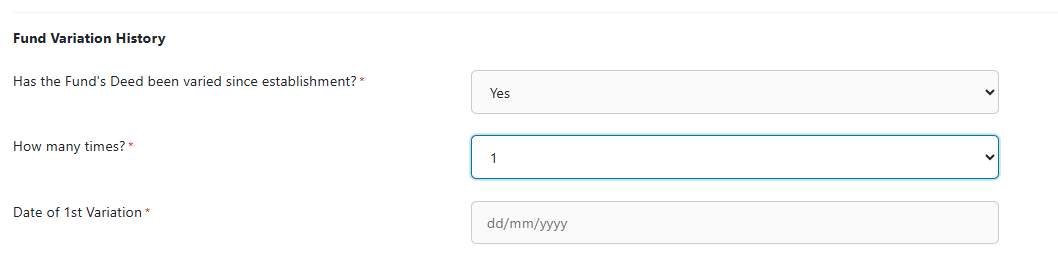
- No — the original deed governs, and the recitals will reference it alone.
- Yes — enter how many times, then the date of each variation in order. The recitals in the change of trustee deed will trace the chain of variations, which is what establishes that the rules you're relying on are the current ones.
Get the variation history right. An incomplete chain of variations is one of the most common defects found when a fund's documents are later reviewed — by an auditor, by a court, or on a member's death.
Rule or clause references
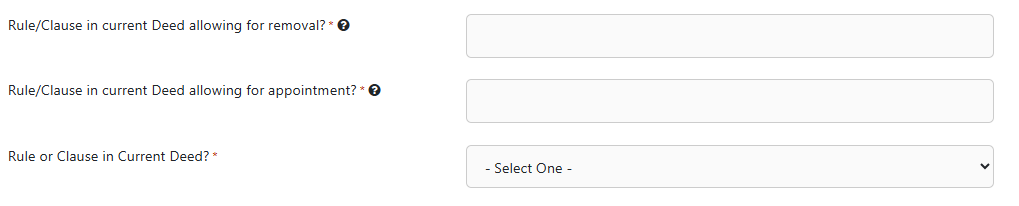
Select whether the current deed uses Rule, Clause or Chapter numbering, then enter:
- Rule/Clause allowing for appointment — shown for every change type except Remove Individual(s) only.
- Rule/Clause allowing for removal — shown for every change type except Add Individual(s) only.
Enter just the reference (for example 12.3), not the full text of the rule.
How is the trustee being removed?

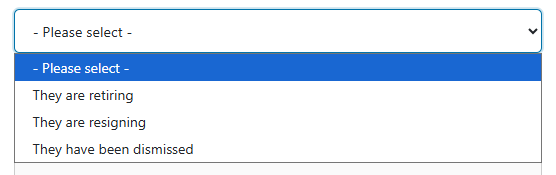
This appears wherever a trustee is coming off, and it changes the language of the deed:
- They are retiring — the standard, consensual exit. Produces retirement recitals and a confirmation clause from the retiring trustee.
- They are resigning — used where the deed frames the exit as a resignation.
- They have been dismissed — a removal by the party holding the power, without the outgoing trustee's consent.
The form then displays the corresponding recital and clause wording in editable text boxes, pre-populated with the standard drafting and the references you entered. Leave them as-is unless the fund's circumstances need different wording — anything you type here appears in the executed deed.
Dismissal is the high-risk path. Removing a trustee without their consent depends entirely on the power in the deed being clear, correctly held, and correctly exercised. If the change is contested, or is happening in the context of a relationship breakdown or a dispute between members, request Smarter Legal Review on the order.
7. Step 6 — Trustee and director details

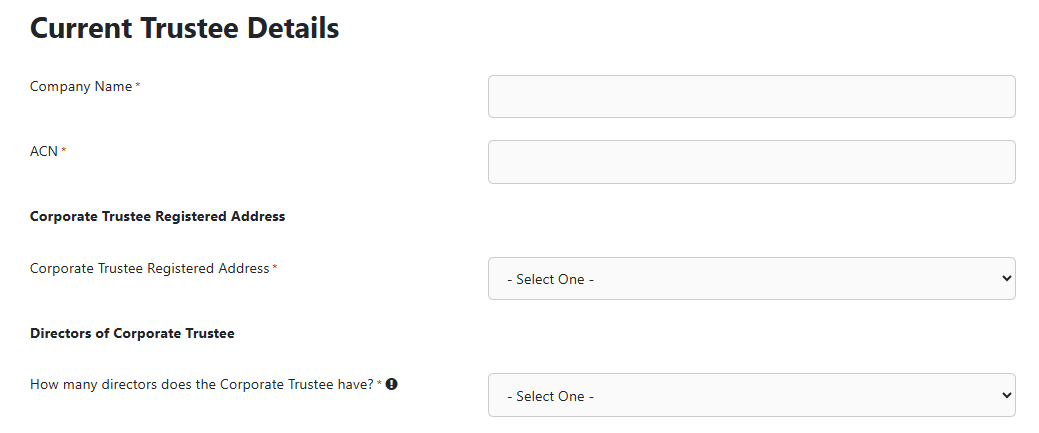
Depending on the change type, you'll be asked how many people are involved, then a block of fields for each one:
- Given Names and Family Name — full legal names, matching the identity documents that will be used for verification. Nicknames and initials cause verification failures.
- Residential Address — use the address lookup, with manual override available.
- Trustee / Director — Email — a unique, individual email address for each incoming person. This is where the identity verification invitation is sent.
Where a corporate trustee is involved you'll also enter the Company Name, ACN, number of directors and registered address (with an optional Care Of line).
Why individual emails are mandatory:
 the verification check is personal to each individual and requires their own photo ID. Sending several invitations to one practice inbox breaks the process and delays the order.
8. Step 7 — Effective date, trustee meeting and chairperson
| Field | Notes |
|---|---|
| Effective date for change of trustee | Optional. Leave blank and the date will not be populated in the deed or supporting documents — useful when you don't yet know when the parties will sign. Complete it when the date is fixed. |
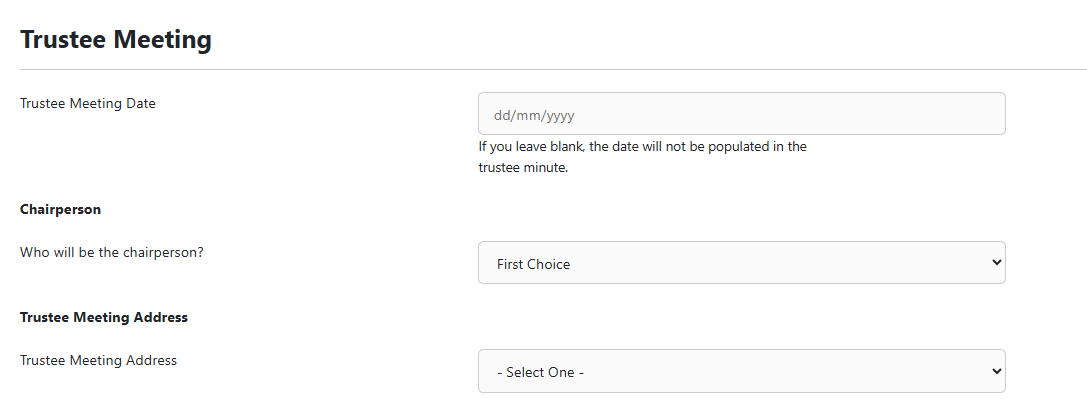
| Trustee Meeting Date | Optional. Leave blank and the trustee minute is produced undated for completion on the day. |
| Chairperson | Who will chair the meeting. Normally a continuing trustee or director rather than an incoming one. |
| Trustee Meeting Address | Select the fund address, or choose Other Address to nominate a different venue — an address search then appears. |
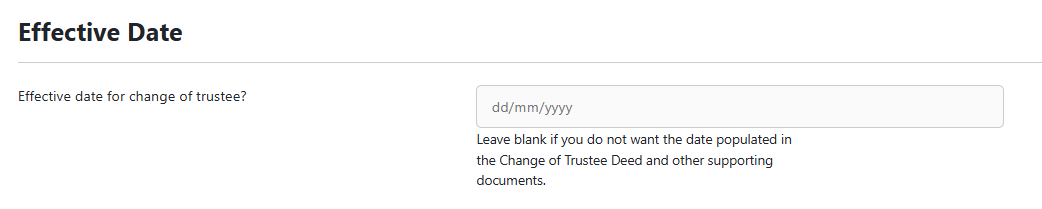
Don't backdate. Set the effective date to the day the parties actually sign, or leave it blank. Backdating a change of trustee creates real problems for the fund's asset titles, its audit and its lodgments.
9. Step 8 — Smarter Legal Review and checkout
Smarter Legal Review (SLR) adds an independent legal review of the order, completed by Hill Legal. Select Yes to include it.
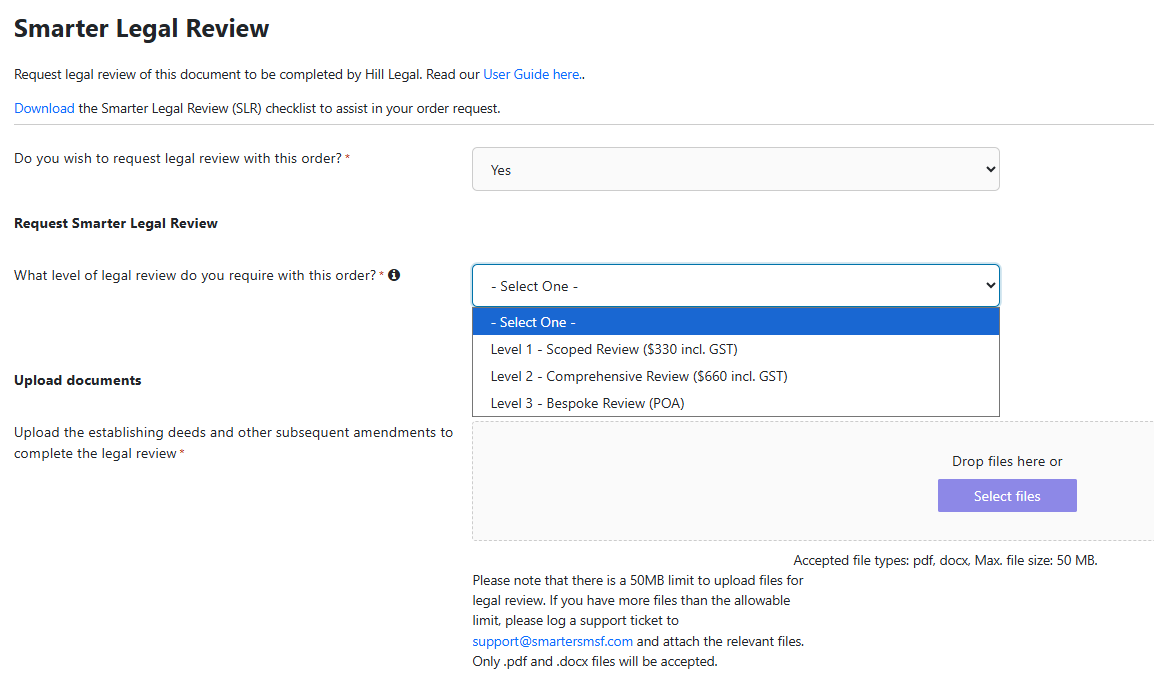
Consider requesting SLR where:
- The deed's appointment or removal power is unclear, or sits with a party who no longer exists.
- The variation history has gaps, or the current deed can't be located in full.
- A trustee is being dismissed rather than retiring.
- The change arises from a death, incapacity, relationship breakdown or dispute.
- The fund holds an LRBA, real property, or assets whose title will need to be transferred.
View the Smarter Legal Review page on our website for more information.
Finalising the order
- Apply a Coupon if you have one — the total updates on screen.
- Use Preview to check the generated documents before committing.
- Save stores the order in Saved Orders so you can come back to it — useful when you're waiting on deed clause references or someone's details.
- Submit. Where verification is required, invitations go out immediately and you can track them under Order KYC Status.
10. Troubleshooting and FAQs
I answered Yes to the KYC question but the declaration won't let me continue.
The declaration is a required selection, not a tick-and-move-on. Select the declaration option to confirm it. If you can't honestly make the declaration for every person on the order, change your answer to No.
Our firm has a reliance agreement, but this particular client was onboarded under a concession. What do I answer?
Answer No, unless you have separately completed full initial CDD for that person in connection with this order. The concession is not full initial CDD.
One of the incoming trustees is overseas. Can they still be verified?
The check is digital and can be completed from anywhere with a government-issued photo ID and a device with a camera. If the person's documents are not Australian, expect the result to take longer, and allow time before the effective date.
The verification came back HIGH risk.
The order is held automatically and the Smarter SMSF compliance team is notified. They review the assessment and will be in touch, generally within one business day. Don't re-order — that creates a duplicate.
Do we need to re-verify a client we verified last month for another order?
No. Verified records are stored against your account and reused for 12 months across all orders — no new check and no new fee.
The fund address won't validate.
Tick Manual Address Override and enter the address manually.
We're only changing the directors of the existing corporate trustee.
That isn't a change of trustee — the trustee is still the same company. Use your corporate compliance workflow to change officeholders and lodge with ASIC.
We don't have the current deed.
Don't guess the clause references. A change of trustee executed under the wrong power is exposed. Locate the deed, or order a deed of variation or rectification first — and consider Smarter Legal Review.
Can I change the wording of the recitals?
Yes. The recital and clause boxes are editable and anything you enter flows into the executed deed. Only change them where the fund's circumstances require it, and have the change reviewed if you're unsure.
This guide explains how to complete the Change of Trustee order form. It is general information only and does not constitute legal or financial advice. Whether a particular change of trustee is validly effected depends on the fund's own governing rules and circumstances. Where the position is unclear, request Smarter Legal Review or seek your own legal advice.