
RA Step 1: How to Complete the Reliance Membership Application Form
This guide walks you through completing the Reliance Membership Application form. This form allows your firm to apply for a Reliance Agreement with Smarter SMSF for the purposes of (s.37A of the AML/CTF Act 2006). It takes around 5 minutes to complete and is made up of 5 steps.
Before You Start
You'll need the following information on hand:
- Your firm's full legal name, ABN, and AUSTRAC Reporting Entity Number (REN)
- Your firm's registered address
- Details of your AML/CTF Compliance Officer, including their title and contact details
- Details of the authorised signatory (director, principal, or duly authorised officer) who will execute the Reliance Agreement via BoxSign
- Details of any beneficial owners holding 25% or more ownership or effective control of the firm, if applicable
Step 1: Confirm Your Eligibility
On the first screen, select the option that matches your firm's subscription status:
- Active Documents Subscriber – select this if your firm holds an active Smarter SMSF Documents subscription. Reliance Membership is included at no additional cost, and KYB/KYC fees are covered by Smarter SMSF.
- PAYG User – select this if your firm accesses the platform on a pay-as-you-go basis. KYB/KYC verification fees will apply and be invoiced separately.

Click Continue to move to the next step.
Step 2: AUSTRAC Details
Enter your firm's official details exactly as registered. These will appear in the Reliance Agreement, so accuracy is important.


- Subscriber firm name – enter the full legal name as registered with ASIC/AUSTRAC
- ABN – enter your firm's 11-digit ABN as enrolled with AUSTRAC
- AUSTRAC Reporting Entity Number (REN) – found in your AUSTRAC Online account
- Registered address – start typing to search for your principal place of business, or tick "Manual Address Override" to enter the details manually
- AML/CTF compliance notices email – the address where all formal notices under the agreement will be sent
Step 3: AML/CTF Compliance
This step confirms your firm's AML/CTF Compliance Officer and your existing AML/CTF program arrangements.
Enter your AML/CTF Compliance Officer's full name, title/role, and (optionally) their contact number and email address if different from the compliance notices email.

You'll then need to tick to confirm the following AML/CTF program statements:
- You maintain an AML/CTF Program and supporting policies that comply with the AML/CTF Act 2006 (Cth) and the AML/CTF Rules 2025
- You have an ongoing staff training program so your team understands their AML/CTF obligations when placing orders through Smarter SMSF
- You engage a third-party AML verification provider to support KYC and KYB checks as part of your customer due diligence process
- You have adequate systems and procedures to recover AML/CTF records and verification results in the event of data loss, system failure, or disaster
You'll also be asked to select how your firm stores and maintains AML/CTF records (for example, within your practice management system, a cloud-based document platform, or your third-party verification provider's platform), since Smarter SMSF needs to understand this as your Relied Upon Entity.

Step 4: Authorised Person
Provide details of the person authorised to execute the Reliance Agreement on behalf of your firm. They will receive the signing envelope via BoxSign. The authorised signatory must be a director, principal, or duly authorised officer of your firm.
- Full name
- Title/role
- Mobile number – must be an Australian mobile starting with 04, as it is required for VerifiMe identity verification (KYB)
- Email address – this is where the BoxSign envelope for signature will be sent

You'll then be asked to declare any beneficial owners. Under the AML/CTF Rules 2025, Smarter SMSF must identify any individuals who directly or indirectly hold 25% or more ownership or voting rights in your firm, or who otherwise exercise effective control. For each person, you'll enter their full name, role/title, ownership percentage, and email address (each will receive a KYC verification invite via VerifiMe). If no such individuals exist beyond the authorised signatory, you can confirm this instead (i.e. click the checkbox).

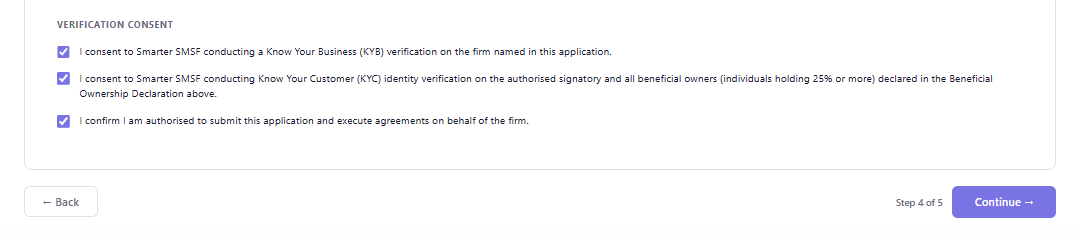
Finally, tick to confirm the following consents:
- Consent to Smarter SMSF conducting a Know Your Business (KYB) verification on your firm
- Consent to Smarter SMSF conducting Know Your Customer (KYC) identity verification on the authorised signatory and any declared beneficial owners
- Confirmation that you are authorised to submit the application and execute agreements on behalf of your firm
 Step 5: Review & Submit
 Step 5: Review & Submit
Review the summary of everything you've entered, including your membership type, AUSTRAC details, AML/CTF compliance information, and authorised signatory details. Once you're satisfied everything is accurate, click Submit application to complete the process.


What Happens Next
Once submitted, Smarter SMSF will review your application and trigger the KYB/KYC verification process.


You can 'Return to the AML Compliance hub'.
 As part of the next steps in the process, the following will be required:
- Directors / Beneficial owners will be required to complete their KYC verification
- KYB check for the firm
- Execution of the Reliance Agreement once issued by Smarter SMSF for electronic signing.
Please note that Smarter SMSF will typically activate the Reliance Membership for existing document subscription holders within 2 business days, subject to timing the the KYC/KYB verification process.